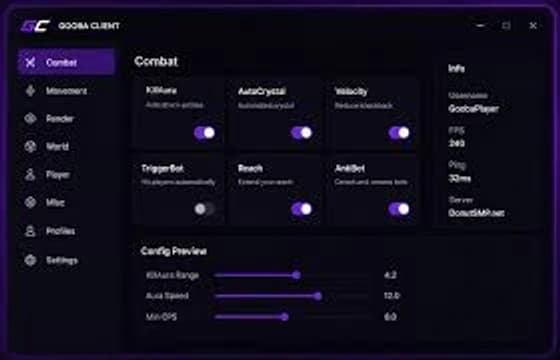
Combat
Client-side combat utilities with configurable controls. Every option is exposed in the in-game config so you decide what is active.
- Toggleable combat utilities
- Per-module keybind and state control
- Configurable behaviour for every option
A modern Minecraft client built for Fabric. A single .jar for Fabric 1.21.11 — combat, movement, visual and utility modules with an in-game config, built to stay out of your way.
Version, loader, file details and module state — the same information you need before and after downloading.
gooba-client.jar · 18.8 MB · released 01 Jan 2026
Combat utilities
client-side, toggleable
Control options
per-module keybind
Timing values
configurable range
Modules
40+
across 4 categories
Categories
4
combat, movement, visuals, utility
Config
In-game
editable from the client GUI
Keybinds
Per module
set in Minecraft controls
Client preview
liveStatus
All systems operational
Recent update
Initial public release.
Interface preview only — this dashboard does not control the running Minecraft client.
Four categories, one consistent interface. Enable what you want, bind the keys you use and adjust the values in the in-game config.
Client-side combat utilities with configurable controls. Every option is exposed in the in-game config so you decide what is active.
Movement utilities with fully customisable controls, kept behind your own keybinds so nothing happens unless you press it.
Visual customisation and HUD tools. Change the client interface, scale the overlay and keep your screen readable.
Quality-of-life tools that make a normal session faster: find blocks and bases, remember settings and jump back in quickly.
Gooba stores its settings next to your other Fabric mods, so switching profiles keeps your configuration intact. Rebind anything from the Minecraft controls screen.
Screenshots taken from a running Minecraft session with Gooba Client loaded. Click any image to open it larger.
Screenshot credits
Captured in a normal Minecraft session with Gooba Client loaded — default game settings, no extra resource pack.
Four steps, no launcher, no account. You only need Fabric for the matching Minecraft version.
Grab the latest build from this website. You get a single .jar file - there is no installer, no launcher and no account required.
Download GoobaOne file. That is the whole install.
Gooba Client is a Fabric mod, so Minecraft needs to run on the Fabric loader for 1.21.11. Install the official Fabric installer and point it at your normal Minecraft profile.
Open fabricmc.netMinecraft Java Edition 1.21.11 · Java 21
Copy the downloaded .jar into your mods directory. On Windows this is usually .minecraft/mods, on macOS and Linux it lives inside the same Minecraft folder. Leave any other Fabric mod you already use in place.
Windows
%appdata%\.minecraft\mods
macOS
~/Library/Application Support/minecraft/mods
Linux
~/.minecraft/mods
Windows: %appdata%/.minecraft/mods
Open the official Minecraft launcher, pick the Fabric 1.21.11 profile and press play. Gooba Client loads with Minecraft and its keybind screen opens from the mod list.
Fabric profile → Play → Gooba Client in the mods list
The four problems people hit most often when the client does not load.
That usually means the wrong Minecraft or loader version. Gooba Client targets Minecraft Java Edition 1.21.11 on the Fabric loader. Re-check the profile you are launching and confirm the Fabric profile matches the version shown on the download card.
Make sure the .jar sits directly inside the mods folder (not a sub-folder, not inside another archive) and that Fabric API is installed as well. Restart the launcher completely afterwards so it rescans the folder.
Delete the previous Gooba jar from your mods folder before copying the new one. Two versions of the client in the same folder will conflict and the game will refuse to launch.
Gooba Client only changes what you enable. Open the module list, pick a category, and turn on the options you want. Settings persist in your config folder, so you only do this once.
One JAR file, served straight from this site. The details below come from the published release, so they always match the file you get.
Gooba Client is a lightweight Fabric client for Minecraft Java Edition. Drop the JAR into your mods folder and launch the Fabric profile.
Release details
Release notes · v1.0.0
Need help getting it running? The community is on Discord.
Join DiscordUpdates are released on a regular cadence. Replace the old JAR in your mods folder with the new one — do not keep two versions side by side.
Gooba Client is a Fabric mod for Minecraft Java Edition. One jar, every platform that can launch the Fabric profile.
Minecraft
Java Edition
1.21.11
Mod loader
Fabric
Required
Runtime
Java 21
Bundled with modern Minecraft
Platforms
Windows · macOS · Linux
Same jar on every platform
Gooba Client loads through Fabric, so you keep your own Minecraft account, worlds and launcher. Fabric API needs to be installed next to the client jar.
The things people ask most often about installing Gooba Client and keeping it updated.
Gooba Client is built for Minecraft Java Edition 1.21.11 and requires the Fabric loader. Other Minecraft versions are not supported yet.
Yes. Gooba Client is a Fabric mod, not a standalone client. Install Fabric for 1.21.11 through the official installer and launch the Fabric profile - that is all the loader setup there is.
Copy the downloaded .jar into your Minecraft mods folder. On Windows that is usually %appdata%/.minecraft/mods. On macOS and Linux it is the mods folder inside your Minecraft directory.
Download the newest build from the download section and replace the old jar in your mods folder. Removing the previous version first avoids conflicts between two builds.
Yes. The download is free and requires no account, no subscription and no launcher.
The Gooba Client Discord is the place for help, bug reports and release announcements. Staff and other users can usually answer questions there faster than anywhere else.
Check three things in order: you are on Minecraft 1.21.11, you are launching the Fabric profile, and Fabric API is installed next to the client jar. The installation page has a full troubleshooting list if that does not help.
Join the Gooba Client community for release announcements, configuration help and people running the same setup you are.
